What is retopology, and when automatic is enough
Retopology rebuilds a messy mesh as clean, even quads. Why models need it, manual versus automatic, the tools in Blender and beyond, and where they fail.
29 September 2026 · 4 min read
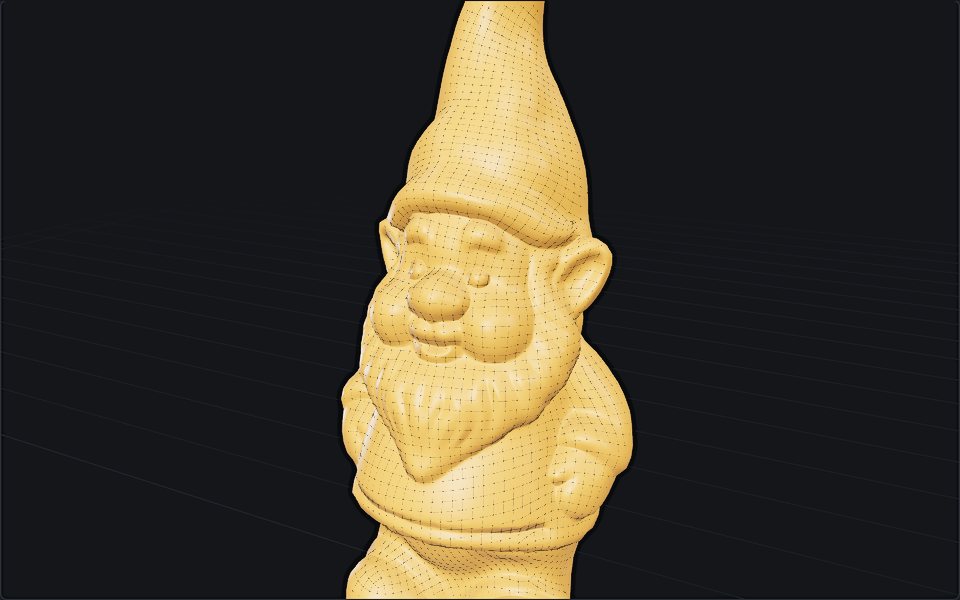
Retopology is rebuilding a model's mesh: keeping its shape, throwing away its polygons, and laying new ones over the surface in a clean, even pattern, usually of four-sided quads. The shape is the same afterwards. What changes is everything you can do with it.
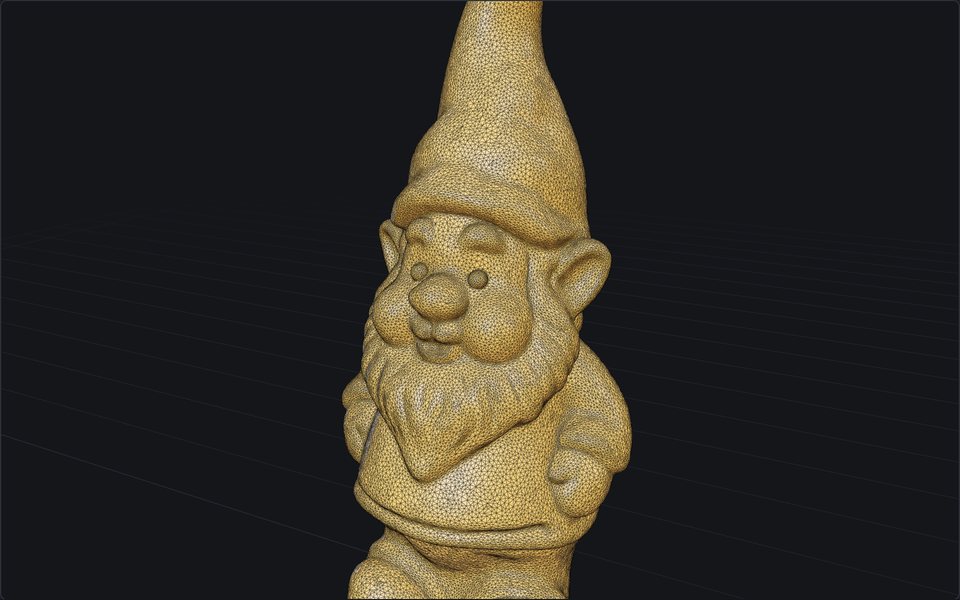
Before: a tangle
After: 5,628 quads
Why a model needs it
The meshes that come out of sculpting, 3D scanning and AI generation are built to hold a shape, not to be worked on. A sculpt has millions of polygons. A scan is a cloud of small triangles with no order to them. A generated model is a couple of hundred thousand triangles laid down by an algorithm, like the gnome above. They all look right in a render, and they all fall apart the moment you try to do something with them:
- Animation. A character's elbow bends cleanly when rings of quads run around it, because the rings stretch and fold like skin. Random triangles crease and tear.
- Editing. A modeller selects edge loops, bevels them, extrudes faces. On a triangle soup there are no loops to select.
- UV unwrapping and texturing. Neat rows of faces unfold into a flat texture layout with little stretching; a tangle unfolds into a mess.
- Performance. A game engine wants a few thousand faces for a prop, not a few hundred thousand.
Topology and retopology
Topology is how a mesh's vertices, edges and faces connect: where the edge loops run, how many faces meet at each corner. Good topology follows the form, with loops around the eyes and mouth of a face and along the length of an arm. Retopology is making new topology for a shape that already exists.
It is not the same as reducing polygons. Reduce removes triangles from the mesh you have, which makes it lighter but keeps its disorder. Retopology throws the old mesh away and builds a new one, which is why it can also give you quads.
Manual or automatic
Manual retopology is drawing the new mesh by hand, face by face, snapped to the surface of the old one. In Blender that is face snapping with a Shrinkwrap modifier, or the RetopoFlow add-on; Maya, 3ds Max, ZBrush and 3DCoat all have their own tools. It is slow, hours for a character, and it is still the best way to get edge loops exactly where an animator needs them around a mouth or a shoulder.
Automatic retopology computes the new mesh. The algorithms estimate which way the surface curves at every point, lay a grid of quads that follows those directions, and choose the size of the quads from the face count you ask for. The main ones:
- Blender's own Remesh. In the Remesh panel of the object data properties, Voxel rebuilds the mesh from cubes (even faces, no edge flow; good for sculpting) and Quad lays quads with QuadriFlow. Free and built in, but it needs a clean, closed mesh and often fails on a scan or a generated model.
- Instant Meshes. Free, open source, a standalone program. Fast and good, if dated.
- Quad Remesher (Exoside) and ZRemesher (ZBrush). Paid, and the best automatic results for characters, because they are good at following the flow of a form.
- Online remeshers, which run one of these on a server: Remesh on this site among them.
The honest line: automatic retopology is enough for anything that does not bend. Props, environment pieces, printed figures, scanned objects and anything you will sculpt on or paint come out well. A face or a body that will be animated closely usually still wants hand-placed loops in the places that deform, even if an automatic pass does the rest.
Why it fails on real files
Every automatic method assumes a surface with a clear inside and outside. The files that most need retopology are the ones that rarely have one: scans with holes, generated models made of overlapping shells, sculpts with parts pushed through each other. Fed one of those, QuadriFlow and Instant Meshes produce holes, flipped patches or nothing. The fix is to seal the model first, which is why Repair exists as a step of its own.
The other failure is thin parts. A quad grid has one size of face, and a strand of hair, a spoke or a sword blade thinner than one face falls through it.
How Remesh here does it
Remesh runs the whole chain on our server, in under a minute for most models:
- Seal the model into one closed surface, whatever state it arrives in.
- Lay the quads with QuadriFlow, falling back to Instant Meshes if it fails. Where a part is thinner than one face, it is widened to one face and remeshed again, so spokes and blades come through.
- Unwrap the new mesh with xatlas.
- Bake the original's colour, roughness and metallic onto the new UVs, and its fine detail into a normal map. That is how the gnome keeps every strand of its beard at 5,628 quads: the strands are in the normal map, not the mesh.
Leave Target on Auto and it remeshes once to measure the model's detail, then picks the face count that should keep the new surface within 0.4% of the original's size; or pick 2K to 50K yourself. Choose Quads for editing and animation, and download the OBJ + textures (ZIP), since GLB can only store triangles. Choose Triangles for a game or the web, where the GLB goes straight in.
For more on taking the result into an engine, see take a generated model into Blender, Unity or Unreal.
More from the blog
29 September 2026 · 5 min
What is a normal map, and why is it purple?
A normal map fakes bumps without adding polygons. How its colours encode direction, OpenGL versus DirectX, normal versus bump, and how to make one.
24 September 2026 · 4 min
How image to 3D works, and why the back is a guess
One photo in, a textured mesh out in about half a minute. What happens in between, what the model cannot know, and the photo that gives it a chance.
23 September 2026 · 4 min
Best AI 3D model generators in 2026, compared
Meshy, Tripo, Rodin, Hunyuan3D, TRELLIS.2 and Stable Fast 3D compared by input, output, price and licence, so you can pick the right one for your job.